Get Service Resources

Retrieve the available service resources based on the selected work type group or work type, and service territory.

A service resource is an employee from your organization, such as a loan officer, investment advisor, doctor, nurse practitioner, or retail store specialist, who attends appointments with clients.

Create a page in your app where you can show the available service resources based on the work type group or work type, and service territory.

  1. Make a POST request on the getAppointmentCandidates REST API by passing the required workTypeGroupId or workTypeId, and territoryIds parameters.

    Resource URI

    1https://YOUR_INSTANCE.salesforce.com/services/data/vXX.X/scheduling/getAppointmentCandidates

    Where YOUR_INSTANCE is a variable.

    For an Existing User (Account)

    To consider an existing user’s preferred visiting hours, pass accountId in the input request body. The preference is enforced when the Include Only Required Service Resources and Ignore Excluded Service Resources policy rules are enabled.

    Sample Request

    Using workTypeGroupId:

    1{
    2  "accountId": "001x0000005DLxpAAG",
    3  "startTime": "2022-04-19T10:30:00.000+0000",
    4  "endTime": "2022-04-19T10:40:00.000+0000",
    5  "workTypeGroupId": "0VSx000000014DmGAI",
    6  "territoryIds": [
    7    "0Hhx000000012oSCAQ"
    8  ]
    9}

    Using workTypeId:

    1{
    2   "accountId" : "001x0000005DLxpAAG",
    3   "startTime" : "2022-04-19T10:30:00.000+0000",
    4   "endTime" : "2022-04-19T10:40:00.000+0000",
    5   "workType" : {
    6                 "id" : "08qx000000014fnAAA"
    7   },
    8   "territoryIds" : ["0Hhx000000012oSCAQ"]
    9}

    Sample Response

    The API returns the service resources and their available time slots.

    1{
    2  "candidates": [
    3    {
    4      "endTime": "2022-04-19T10:40:00.000+0000",
    5      "resources": [
    6        "0Hnx000000006GcCAI"
    7      ],
    8      "startTime": "2022-04-19T10:30:00.000+0000",
    9      "territoryId": "0Hhx000000012oSCAQ"
    10    },
    11    {
    12      "endTime": "2022-04-19T10:40:00.000+0000",
    13      "resources": [
    14        "0Hnx000000006GfCAI"
    15      ],
    16      "startTime": "2022-04-19T10:30:00.000+0000",
    17      "territoryId": "0Hhx000000012oSCAQ"
    18    },
    19    {
    20      "endTime": "2022-04-19T10:40:00.000+0000",
    21      "resources": [
    22        "0Hnx000000006GbCAI"
    23      ],
    24      "startTime": "2022-04-19T10:30:00.000+0000",
    25      "territoryId": "0Hhx000000012oSCAQ"
    26    },
    27    {
    28      "endTime": "2022-04-19T10:40:00.000+0000",
    29      "resources": [
    30        "0Hnx000000006GwCAI"
    31      ],
    32      "startTime": "2022-04-19T10:30:00.000+0000",
    33      "territoryId": "0Hhx000000012oSCAQ"
    34    },
    35    {
    36      "endTime": "2022-04-19T10:40:00.000+0000",
    37      "resources": [
    38        "0Hnx000000006GyCAI"
    39      ],
    40      "startTime": "2022-04-19T10:30:00.000+0000",
    41      "territoryId": "0Hhx000000012oSCAQ"
    42    },
    43    {
    44      "endTime": "2022-04-19T10:40:00.000+0000",
    45      "resources": [
    46        "0Hnx000000006GuCAI"
    47      ],
    48      "startTime": "2022-04-19T10:30:00.000+0000",
    49      "territoryId": "0Hhx000000012oSCAQ"
    50    },
    51    {
    52      "endTime": "2022-04-19T10:40:00.000+0000",
    53      "resources": [
    54        "0Hnx000000006GtCAI"
    55      ],
    56      "startTime": "2022-04-19T10:30:00.000+0000",
    57      "territoryId": "0Hhx000000012oSCAQ"
    58    },
    59    {
    60      "endTime": "2022-04-19T10:40:00.000+0000",
    61      "resources": [
    62        "0Hnx000000006GsCAI"
    63      ],
    64      "startTime": "2022-04-19T10:30:00.000+0000",
    65      "territoryId": "0Hhx000000012oSCAQ"
    66    },
    67    {
    68      "endTime": "2022-04-19T10:40:00.000+0000",
    69      "resources": [
    70        "0Hnx000000006GmCAI"
    71      ],
    72      "startTime": "2022-04-19T10:30:00.000+0000",
    73      "territoryId": "0Hhx000000012oSCAQ"
    74    },
    75    {
    76      "endTime": "2022-04-19T10:40:00.000+0000",
    77      "resources": [
    78        "0Hnx000000006GnCAI"
    79      ],
    80      "startTime": "2022-04-19T10:30:00.000+0000",
    81      "territoryId": "0Hhx000000012oSCAQ"
    82    },
    83    {
    84      "endTime": "2022-04-19T10:40:00.000+0000",
    85      "resources": [
    86        "0Hnx000000006GlCAI"
    87      ],
    88      "startTime": "2022-04-19T10:30:00.000+0000",
    89      "territoryId": "0Hhx000000012oSCAQ"
    90    },
    91    {
    92      "endTime": "2022-04-19T10:40:00.000+0000",
    93      "resources": [
    94        "0Hnx000000006H4CAI"
    95      ],
    96      "startTime": "2022-04-19T10:30:00.000+0000",
    97      "territoryId": "0Hhx000000012oSCAQ"
    98    },
    99    {
    100      "endTime": "2022-04-19T10:40:00.000+0000",
    101      "resources": [
    102        "0Hnx000000006H2CAI"
    103      ],
    104      "startTime": "2022-04-19T10:30:00.000+0000",
    105      "territoryId": "0Hhx000000012oSCAQ"
    106    },
    107    {
    108      "endTime": "2022-04-19T10:40:00.000+0000",
    109      "resources": [
    110        "0Hnx000000006H3CAI"
    111      ],
    112      "startTime": "2022-04-19T10:30:00.000+0000",
    113      "territoryId": "0Hhx000000012oSCAQ"
    114    }
    115  ]
    116}

    For a Guest User (Lead)

    Sample Request

    Using workTypeGroupId:

    1{
    2  "startTime": "2022-04-19T10:30:00.000+0000",
    3  "endTime": "2022-04-19T10:40:00.000+0000",
    4  "workTypeGroupId": "0VSx000000014DmGAI",
    5  "territoryIds": [
    6    "0Hhx000000012oSCAQ"
    7  ]
    8}

    Using workTypeId:

    1{
    2  "startTime": "2022-04-19T10:30:00.000+0000",
    3  "endTime": "2022-04-19T10:40:00.000+0000",
    4  "workType": {
    5    "id": "08qx000000014fnAAA"
    6  },
    7  "territoryIds": [
    8    "0Hhx000000012oSCAQ"
    9  ]
    10}

    Sample Response

    The API returns the service resources and their available time slots.

    1{
    2  "candidates": [
    3    {
    4      "endTime": "2022-04-19T10:40:00.000+0000",
    5      "resources": [
    6        "0Hnx000000006GcCAI"
    7      ],
    8      "startTime": "2022-04-19T10:30:00.000+0000",
    9      "territoryId": "0Hhx000000012oSCAQ"
    10    },
    11    {
    12      "endTime": "2022-04-19T10:40:00.000+0000",
    13      "resources": [
    14        "0Hnx000000006GfCAI"
    15      ],
    16      "startTime": "2022-04-19T10:30:00.000+0000",
    17      "territoryId": "0Hhx000000012oSCAQ"
    18    },
    19    {
    20      "endTime": "2022-04-19T10:40:00.000+0000",
    21      "resources": [
    22        "0Hnx000000006GbCAI"
    23      ],
    24      "startTime": "2022-04-19T10:30:00.000+0000",
    25      "territoryId": "0Hhx000000012oSCAQ"
    26    },
    27    {
    28      "endTime": "2022-04-19T10:40:00.000+0000",
    29      "resources": [
    30        "0Hnx000000006GwCAI"
    31      ],
    32      "startTime": "2022-04-19T10:30:00.000+0000",
    33      "territoryId": "0Hhx000000012oSCAQ"
    34    },
    35    {
    36      "endTime": "2022-04-19T10:40:00.000+0000",
    37      "resources": [
    38        "0Hnx000000006GyCAI"
    39      ],
    40      "startTime": "2022-04-19T10:30:00.000+0000",
    41      "territoryId": "0Hhx000000012oSCAQ"
    42    },
    43    {
    44      "endTime": "2022-04-19T10:40:00.000+0000",
    45      "resources": [
    46        "0Hnx000000006GuCAI"
    47      ],
    48      "startTime": "2022-04-19T10:30:00.000+0000",
    49      "territoryId": "0Hhx000000012oSCAQ"
    50    },
    51    {
    52      "endTime": "2022-04-19T10:40:00.000+0000",
    53      "resources": [
    54        "0Hnx000000006GtCAI"
    55      ],
    56      "startTime": "2022-04-19T10:30:00.000+0000",
    57      "territoryId": "0Hhx000000012oSCAQ"
    58    },
    59    {
    60      "endTime": "2022-04-19T10:40:00.000+0000",
    61      "resources": [
    62        "0Hnx000000006GsCAI"
    63      ],
    64      "startTime": "2022-04-19T10:30:00.000+0000",
    65      "territoryId": "0Hhx000000012oSCAQ"
    66    },
    67    {
    68      "endTime": "2022-04-19T10:40:00.000+0000",
    69      "resources": [
    70        "0Hnx000000006GmCAI"
    71      ],
    72      "startTime": "2022-04-19T10:30:00.000+0000",
    73      "territoryId": "0Hhx000000012oSCAQ"
    74    },
    75    {
    76      "endTime": "2022-04-19T10:40:00.000+0000",
    77      "resources": [
    78        "0Hnx000000006GnCAI"
    79      ],
    80      "startTime": "2022-04-19T10:30:00.000+0000",
    81      "territoryId": "0Hhx000000012oSCAQ"
    82    },
    83    {
    84      "endTime": "2022-04-19T10:40:00.000+0000",
    85      "resources": [
    86        "0Hnx000000006GlCAI"
    87      ],
    88      "startTime": "2022-04-19T10:30:00.000+0000",
    89      "territoryId": "0Hhx000000012oSCAQ"
    90    },
    91    {
    92      "endTime": "2022-04-19T10:40:00.000+0000",
    93      "resources": [
    94        "0Hnx000000006H4CAI"
    95      ],
    96      "startTime": "2022-04-19T10:30:00.000+0000",
    97      "territoryId": "0Hhx000000012oSCAQ"
    98    },
    99    {
    100      "endTime": "2022-04-19T10:40:00.000+0000",
    101      "resources": [
    102        "0Hnx000000006H2CAI"
    103      ],
    104      "startTime": "2022-04-19T10:30:00.000+0000",
    105      "territoryId": "0Hhx000000012oSCAQ"
    106    },
    107    {
    108      "endTime": "2022-04-19T10:40:00.000+0000",
    109      "resources": [
    110        "0Hnx000000006H3CAI"
    111      ],
    112      "startTime": "2022-04-19T10:30:00.000+0000",
    113      "territoryId": "0Hhx000000012oSCAQ"
    114    }
    115  ]
    116}

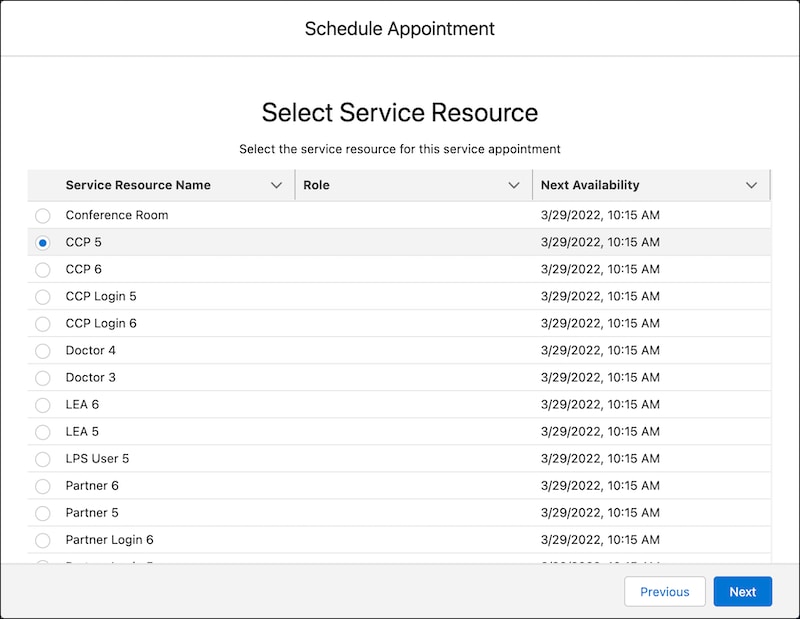
Parse the JSON response, and display the available service resources on web page so that users can select a service resource for the appointment. Here’s how that page can look.

A representation of the Select Service Resource screen.

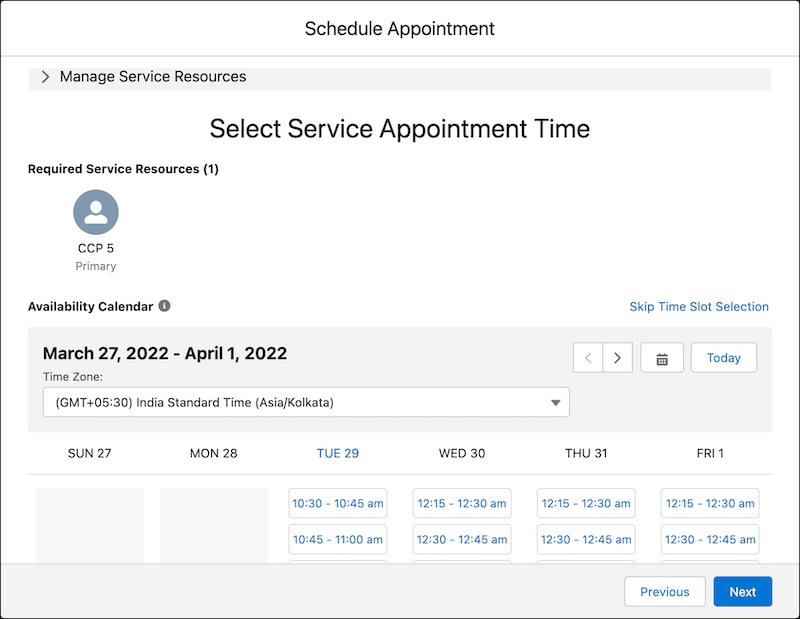
When users select a resource, show the available time slots for the selected resource. Here’s how a page showing the available time slots can look.

A representation of the Select Service Appointment Time screen.

On the next page in your app, you can show the appointment details for the user to review and create the appointment.