Book Concurrent Appointments with Dummy Resource
Use the concurrent scheduling feature of Salesforce Scheduler to easily schedule multiple service appointments in the same time slot. An event is created for each service appointment. Create concurrent appointments by using the dummy resource for the various time slots available for the day.
A concurrent time slot can have 2 to 1,000 appointments.
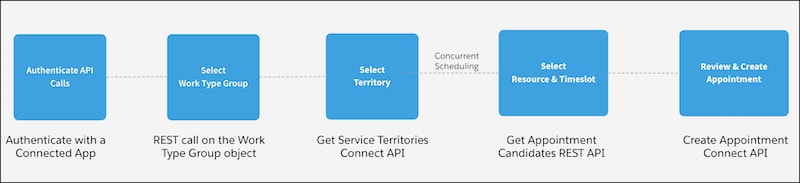
Here’s a high-level overview of how to build a concurrent scheduling app.
-
Get Work Type Groups
A work type group represents a general appointment category or topic, such as a home loan or investment. Show your users your work type groupson the landing page of your app by retrieving the list of work type groups from your Salesforce instance. Your users can select a work type group from the list while booking appointments.
-
Get Service Territories
A service territory represents a branch or office location where your service resources (appointment attendees) operate from or meet customers. Show your users your available service territorieson the next page on your website by retrieving a list of active service territories from your Salesforce instance. Your users can search for service territories based on user-entered name, city, postal code, or state. Users can also view the distance between two locations, such as between a service territory and the user’s current location.
-
Get Dummy Service Resource
Show your users the dummy resource and its availability based on the selected work type group and service territory.
-
Create Service Appointments
Show your users the details of a service appointment—an appointment booked through Salesforce Scheduler—so that users can review and create the appointment.


 j
j