Get Service Territories

A service territory represents a branch or office location where your service resources (appointment attendees) operate from or meet customers. Show your users your available service territorieson the next page on your website by retrieving a list of active service territories from your Salesforce instance. Your users can search for service territories based on user-entered name, city, postal code, or state. Users can also view the distance between two locations, such as between a service territory and the user’s current location.

  1. Create a page for users to search for service territories.

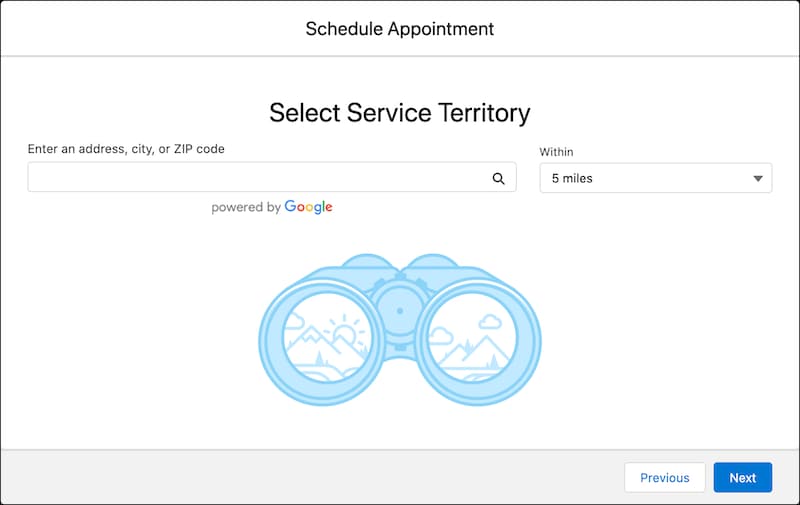
    Here’s how a Select Service Territory page can look.

    A representation of the Select Service Territory screen.

  2. To retrieve a list of active service territories from your Salesforce instance, use the service-territories Connect API request.

    Sample Request

    This sample REST API call uses the service-territories request to retrieve service territories within a range of 10 miles from your current location. The default value is 5 miles.

    1https://YOUR_INSTANCE.salesforce.com/services/data/v68.0/connect/scheduling​​​/service-territories?workTypeGroupId=0VSS70000004DvWOAU

    Where YOUR_INSTANCE is a variable.

    Sample Response

    The request returns the service territory records.

    1{
    2  "result": {
    3    "serviceTerritories": [
    4      {
    5        "city": "Hyderabad",
    6        "country": "India",
    7        "id": "0HhS70000004F9zKAE",
    8        "name": "ServiceTerritory1",
    9        "operatingHoursId": "0OHS70000004FIxOAM",
    10        "postalCode": "500032",
    11        "state": "TG"
    12      }
    13    ]
    14  }
    15}
  3. Parse the JSON response, and show the available service territories on a page that you created. Your users can select a service territory for the appointment.