


Health Cloud Administration
 j
jQuick Start List for a Successful Health Cloud Implementation
First, let's meet Maya Ray, an admin at StayHealthy Foundation. Maya is trying to get Health Cloud up and running in her Salesforce org. She has the Health Cloud Administration Guide open in one tab and Trailhead open in another, but she’s still confused. Does she have to install the Health Cloud managed package first or assign the permission sets?
Maya wants to eliminate errors and minimize duplicate work (and the added stress that comes with it), and we get that. Setting up a new product from scratch can be stressful and there’s room for error. That’s why it's important to understand exactly which tasks to complete and in what order. So for a smooth implementation experience, we’ve provided a list of tasks in their order of implementation, along with a workflow diagram.
After Maya goes to Setup and ensures that she’s assigned herself the System Admin profile, she's ready to roll.
- Enable Contacts to Multiple Accounts Settings.
- Set up Chatter.
- Make Data Protection Details Available in Records
- Install the Health Cloud Managed Package.
- Assign the Health Cloud CRM license.
- Assign the Health Cloud permission set license and the Health Cloud Platform permission set license.
- Enable Person Accounts
- Update the Person Account setting to Enable.
- Set up a mapping record for Person Accounts.
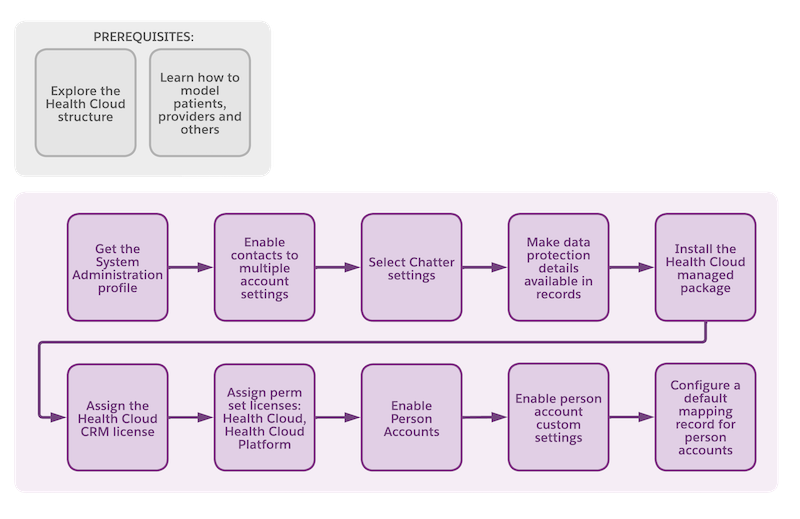
After Maya completes all of these tasks, she is ready to start customizing her Health Cloud org.