Health Cloud Administration
 j
jAdd Enhanced Timeline to a Record Page
To let your Health Cloud users see the Timeline and its data,
add it to a Lightning record page.
|
Available in: Lightning Experience Available in: Enterprise and Unlimited Editions |
| User Permissions Needed | |
|---|---|
| To configure a Timeline: | Read and Edit access for objects you’re including on the Timeline |
- Go to the record page of the object on which you created a timeline.
- Select the gear icon on the top-right corner of the page and then click Edit Page.
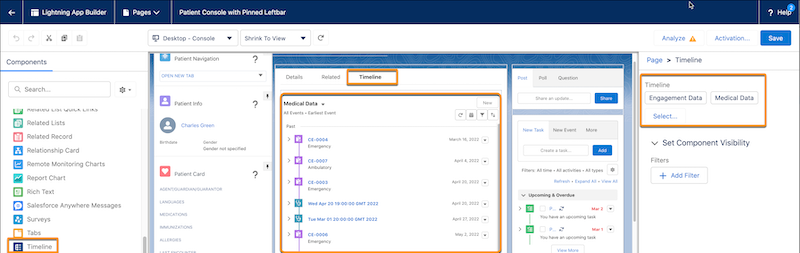
- Drag the Timeline component to the editable content area.
- To select the timeline configurations you want to make available to users, click Select in the component properties panel.
-
In the Timeline window, select the required configurations and then click
OK.
You can select up to 5 timeline configurations.
- Save and activate your changes.