


Apex リファレンスガイド
 j
jカスタム設定メソッド
使用方法
カスタム設定メソッドはすべてインスタンスメソッドです。つまり、カスタム設定の特定のインスタンスでコールされ、動作します。カスタム設定には、階層とリストの 2 種類があります。メソッドには、リストカスタム設定を処理するメソッドと階層カスタム設定を処理するメソッドの 2 種類があります。
Salesforce ユーザーインターフェースでのカスタム設定の作成についての詳細は、Salesforce オンラインヘルプの「カスタム設定の作成」を参照してください。
カスタム設定の例
次の例では、Games というリストカスタム設定を使用します。Games 設定には GameType という項目があります。この例では、最初のデータセットの値が文字列 PC がどうかを決定します。
1List<Games__C> mcs = Games__c.getall().values();
2boolean textField = null;
3if (mcs[0].GameType__c == 'PC') {
4  textField = true;
5}
6system.assertEquals(textField, true);1Foundation_Countries__c myCS1 = Foundation_Countries__c.getValues('United States');
2String myCCVal = myCS1.Country_code__c;
3Foundation_Countries__c myCS2 = Foundation_Countries__c.getInstance('United States');
4String myCCInst = myCS2.Country_code__c;
5system.assertEquals(myCCinst, myCCVal);階層カスタム設定の例
次の例では、階層カスタム設定 GamesSupport に Corporate_number という項目があります。コードは pid で指定されたプロファイルの値を返します。
1GamesSupport__c mhc = GamesSupport__c.getInstance(pid);
2string mPhone = mhc.Corporate_number__c;次の例では、階層カスタム設定メソッドの使用方法を示します。この例では、getInstance には、階層の下から 2 番目のレベルで定義されている項目から返される特定のユーザーまたはプロファイルに設定されない項目値が返されます。また、getOrgDefaults の使用方法を例で示します。
- 組織の設定
- OverrideMe: Hello
- DontOverrideMe: World
- プロファイルの設定
- OverrideMe: Goodbye
- DontOverrideMe は設定されません。
- ユーザーの設定
- OverrideMe: Fluffy
- DontOverrideMe は設定されません。
1Hierarchy__c CS = Hierarchy__c.getInstance();
2System.Assert(CS.OverrideMe__c == 'Fluffy');
3System.assert(CS.DontOverrideMe__c == 'World');1Hierarchy__c CS = Hierarchy__c.getInstance(RobertId);
2System.Assert(CS.OverrideMe__c == 'Fluffy');
3System.assert(CS.DontOverrideMe__c == 'World');1Hierarchy__c CS = Hierarchy__c.getInstance(SysAdminID);
2System.Assert(CS.OverrideMe__c == 'Goodbye');
3System.assert(CS.DontOverrideMe__c == 'World');1Hierarchy__c CS = Hierarchy__c.getOrgDefaults();
2System.Assert(CS.OverrideMe__c == 'Hello');
3System.assert(CS.DontOverrideMe__c == 'World');1Hierarchy__c CS = Hierarchy__c.getValues(RobertId);
2System.Assert(CS.OverrideMe__c == 'Fluffy');
3// Note how this value is null, because you are returning
4// data specific for the user
5System.assert(CS.DontOverrideMe__c == null);1Hierarchy__c CS = Hierarchy__c.getValues(SysAdminID);
2System.Assert(CS.OverrideMe__c == 'Goodbye');
3// Note how this value is null, because you are returning
4// data specific for the profile
5System.assert(CS.DontOverrideMe__c == null);国コードと州コードのカスタム設定例
この例では、関連する情報を保存するために 2 つのカスタム設定オブジェクトを使用する方法と、関連する選択リストの集合のデータを表示する Visualforce ページについて示します。
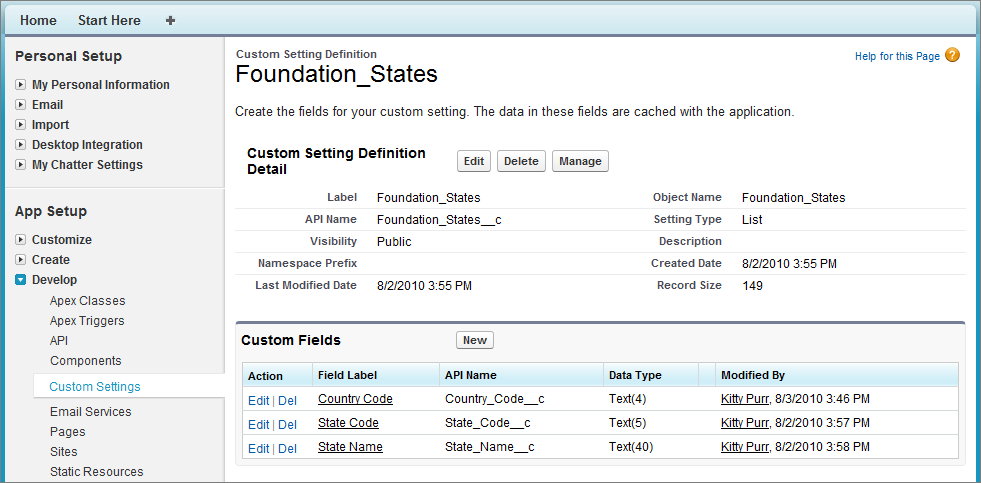
次の例では、国コードと州コードは、Foundation_Countries と Foundation_States という 2 つの異なるカスタム設定に保存されます。
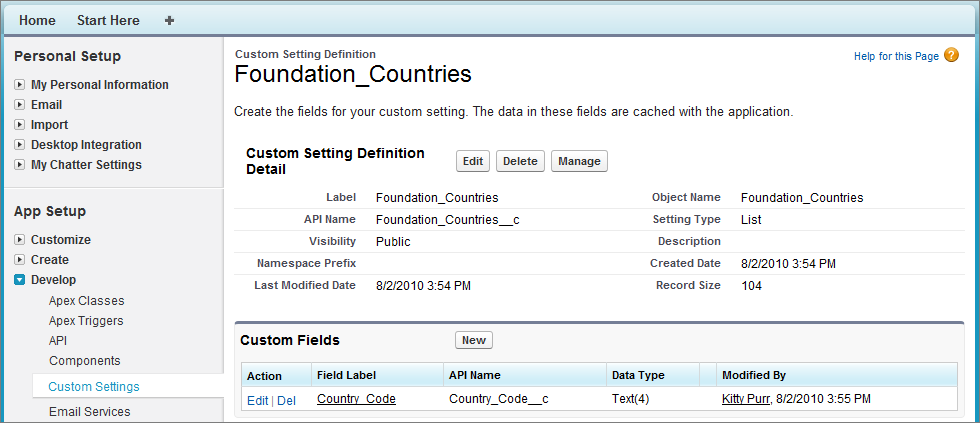
- 国コード
- 都道府県コード
- 都道府県名
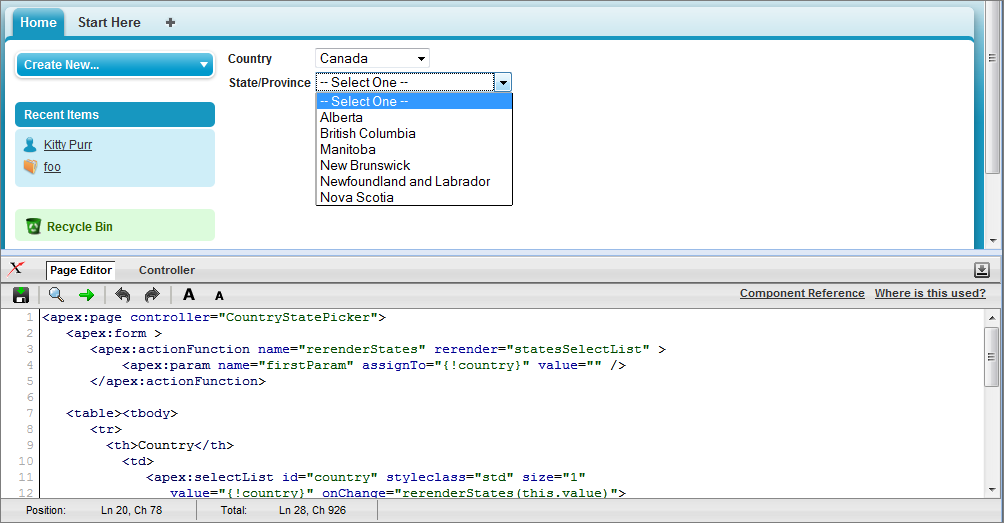
1<apex:page controller="CountryStatePicker">
2   <apex:form >
3      <apex:actionFunction name="rerenderStates" rerender="statesSelectList" >
4          <apex:param name="firstParam" assignTo="{!country}" value="" />
5      </apex:actionFunction>
6
7   <table><tbody>
8      <tr>
9        <th>Country</th>
10          <td>
11             <apex:selectList id="country" styleclass="std" size="1"
12                value="{!country}" onChange="rerenderStates(this.value)">
13                    <apex:selectOptions value="{!countriesSelectList}"/>
14             </apex:selectList>
15          </td>
16      </tr>
17      <tr id="state_input">
18        <th>State/Province</th>
19          <td>
20            <apex:selectList id="statesSelectList" styleclass="std" size="1"
21                 value="{!state}">
22                   <apex:selectOptions value="{!statesSelectList}"/>
23            </apex:selectList>
24          </td>
25      </tr>
26   </tbody></table>
27   </apex:form>
28</apex:page>1public with sharing class CountryStatePicker {
2
3// Variables to store country and state selected by user
4 public String state { get; set; }
5 public String country {get; set;}
6
7 // Generates country dropdown from country settings
8 public List<SelectOption> getCountriesSelectList() {
9 List<SelectOption> options = new List<SelectOption>();
10 options.add(new SelectOption('', '-- Select One --'));
11
12 // Find all the countries in the custom setting
13 Map<String, Foundation_Countries__c> countries = Foundation_Countries__c.getAll();
14
15 // Sort them by name
16 List<String> countryNames = new List<String>();
17 countryNames.addAll(countries.keySet());
18 countryNames.sort();
19
20 // Create the Select Options.
21 for (String countryName : countryNames) {
22 Foundation_Countries__c country = countries.get(countryName);
23 options.add(new SelectOption(country.country_code__c, country.Name));
24 }
25 return options;
26 }
27
28 // To generate the states picklist based on the country selected by user.
29 public List<SelectOption> getStatesSelectList() {
30 List<SelectOption> options = new List<SelectOption>();
31 // Find all the states we have in custom settings.
32 Map<String, Foundation_States__c> allstates = Foundation_States__c.getAll();
33
34 // Filter states that belong to the selected country
35 Map<String, Foundation_States__c> states = new Map<String, Foundation_States__c>();
36 for(Foundation_States__c state : allstates.values()) {
37 if (state.country_code__c == this.country) {
38 states.put(state.name, state);
39 }
40 }
41
42 // Sort the states based on their names
43 List<String> stateNames = new List<String>();
44 stateNames.addAll(states.keySet());
45 stateNames.sort();
46
47 // Generate the Select Options based on the final sorted list
48 for (String stateName : stateNames) {
49 Foundation_States__c state = states.get(stateName);
50 options.add(new SelectOption(state.state_code__c, state.state_name__c));
51 }
52
53 // If no states are found, just say not required in the dropdown.
54 if (options.size() > 0) {
55 options.add(0, new SelectOption('', '-- Select One --'));
56 } else {
57 options.add(new SelectOption('', 'Not Required'));
58 }
59 return options;
60 }
61}リストカスタム設定メソッド
次に、リストカスタム設定のインスタンスメソッドを示します。
getAll()
署名
public Map<String, CustomSetting__c> getAll()
戻り値
型: Map<String, CustomSetting__c>
使用方法
データセットが定義されていない場合、このメソッドは空の対応付けを返します。
getInstance(dataSetName)
署名
public CustomSetting__c getInstance(String dataSetName)
パラメーター
- dataSetName
- 型: String
戻り値
型: CustomSetting__c
getValues(dataSetName)
署名
public CustomSetting__c getValues(String dataSetName)
パラメーター
- dataSetName
- 型: String
戻り値
型: CustomSetting__c
使用方法
指定されたデータセットにデータが定義されていない場合は、このメソッドは null を返します。
階層カスタム設定メソッド
次に、階層カスタム設定のインスタンスメソッドを示します。
getInstance()
署名
public CustomSetting__c getInstance()
戻り値
型: CustomSetting__c
使用方法
例
- ユーザーに定義されているカスタム設定データセット: 「山田太郎」というユーザー、「システム管理者」というプロファイル、および組織全体に定義されたカスタム設定データセットがあり、コードを実行しているユーザーが山田太郎である場合、このメソッドは、山田太郎に定義されているカスタム設定レコードを返します。
- 差し込み項目: 「山田太郎」というユーザーと「システム管理者」というプロファイルに項目 A および項目 B を持つカスタム設定データセットがあるとします。項目 A は山田太郎に定義されており、項目 B は null であるがシステム管理者プロファイルに定義されている場合、このメソッドは、山田太郎には、山田太郎の項目 A とシステム管理者プロファイルから得た項目 B を持つカスタム設定レコードを返します。
- ユーザーにカスタム設定データセットレコードが定義されていない: 現在のユーザーが「井上花子」であり、「システム管理者」プロファイルを共有しているが、ユーザーとしての井上花子に定義されたデータがない場合、このメソッドは、ID が null で、階層内で最下位レベルに定義された項目に基づいて差し込まれた項目を持つ、新しいカスタム設定レコードを返します。
getInstance(userId)
署名
public CustomSetting__c getInstance(ID userId)
パラメーター
- userId
- 型: ID
戻り値
型: CustomSetting__c
getInstance(profileId)
署名
public CustomSetting__c getInstance(ID profileId)
パラメーター
- profileId
- 型: ID
戻り値
型: CustomSetting__c
getOrgDefaults()
署名
public CustomSetting__c getOrgDefaults()
戻り値
型: CustomSetting__c
使用方法
組織にカスタム設定データが定義されていない場合、このメソッドは空のカスタム設定オブジェクトを返します。
getValues(userId)
署名
public CustomSetting__c getValues(ID userId)
パラメーター
- userId
- 型: ID
戻り値
型: CustomSetting__c
使用方法
ユーザーレベルで定義されているカスタム設定データのサブセットが必要な場合にのみ使用します。たとえば、組織レベルで「alpha」の値を割り当てられているカスタム設定項目があり、ユーザーレベルまたはプロファイルレベルで値が割り当てられていないとします。getValues(UserId) は、このカスタム設定項目に null を返します。
getValues(profileId)
署名
public CustomSetting__c getValues(ID profileId)
パラメーター
- profileId
- 型: ID
戻り値
型: CustomSetting__c
使用方法
プロファイルレベルで定義されているカスタム設定データのサブセットが必要な場合にのみ使用します。たとえば、組織レベルで「alpha」の値を割り当てられているカスタム設定項目があり、ユーザーレベルまたはプロファイルレベルで値が割り当てられていないとします。getValues(ProfileId) は、このカスタム設定項目に null を返します。