


Health Cloud Administration
 j
jConfigure Path Settings for Engagement Interactions in Contact Center
Help contact center agents view the progression of patient interactions, from the
initial call to identity verification and resolution. Set up a path to display the status of the
engagement interaction.
|
Available in: Lightning Experience Available in: Enterprise and Unlimited Editions with Health Cloud |
| User Permissions Needed | |
|---|---|
| To use the Contact Center for Health Cloud | Manage Contact Center for Health Cloud |
- From Setup, in the Quick Find box, enter Path Settings, and then select Path Settings.
- Click Enable.
- Click New Path.
-
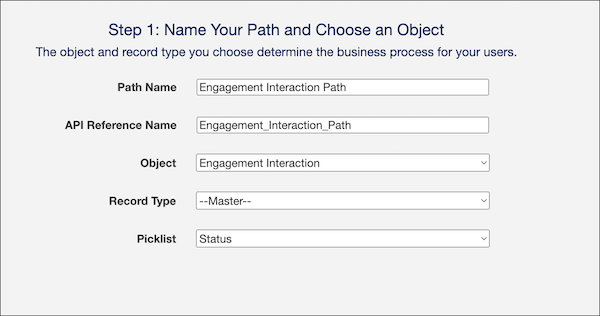
In the Name Your Path and Choose an Object window, add the following details.
- In Path Name, enter Engagement Interaction Path.
- In API Reference Name, Engagement_Interaction_Path is auto-populated. Keep it as is.
- In Object, select Engagement Interaction.
- In Record Type, leave the default value, –Master–.
- For Picklist, select Status.
-
Click Next.
-
In the Select Fields and Provide Guidance window, add fields for each status value.
- Click Add/Update Fields.
- Move fields from the Available column to the Selected Fields column.
- Add guidance for success.
- Save your changes.
- Click Next.
- Select Activate Your Path.
-
To display a celebratory animation when users complete the path, select Enable
Celebrations, and add these details:
- Select the picklist value for celebration.
- Select a Celebration Frequency.
- Click Finish.