


Health Cloud Administration
 j
jSet Up Provider Relationship Cards to Show Practitioner Information
Identify the information your users look for on each Provider Relationship Card, then use the card setup wizard to connect the various objects that contain that information.
For example, you might set it up so that on the Account record page for a hospital, your call center agent sees a card for each physician working at that hospital. Or, on a Person Account record page for a doctor, the network management team can see a card for each hospital, urgent care center, or other organization where that doctor works.
A relationship card can draw its content from objects that its parent or child objects, up to three hops away. For example, this card is based on the Healthcare Practitioner Facility object, but it also uses information from objects that are related to that object through one or two intermediate objects. The fields in blue are the objects that we are pulling information from to display, in this scenario.
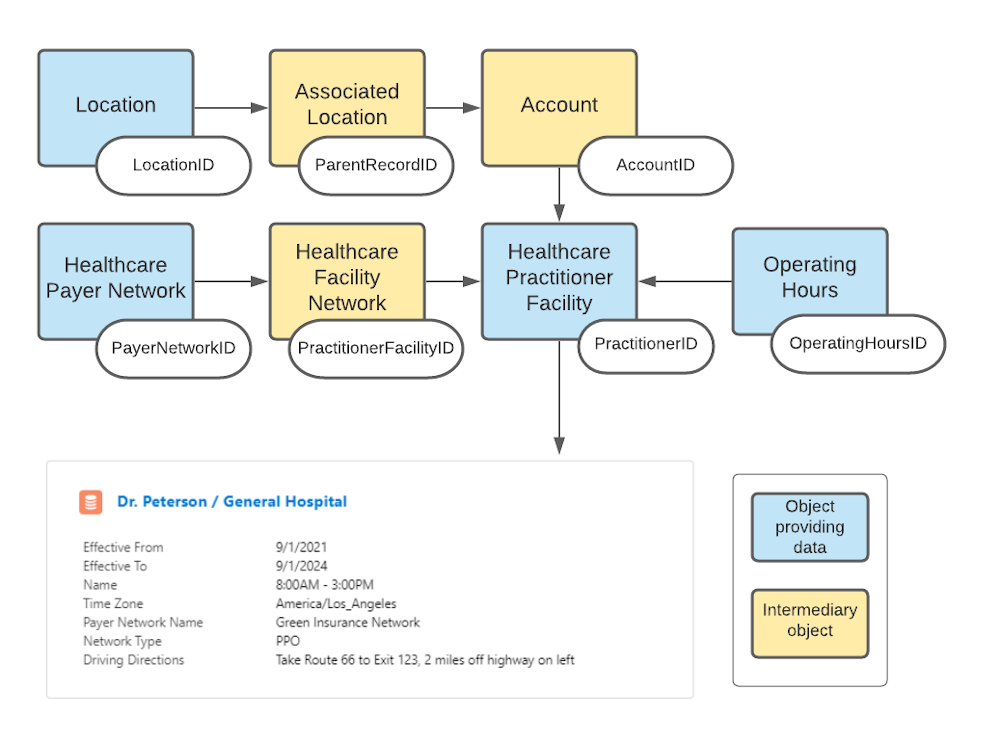
You’ll generally want a card to show each practitioner at a given practice or hospital or health center (from the Healthcare Practitioner Facility object), with their contact information, specialty information, and anything else related that your organization finds useful.