
Appearance
Get Hands on with Data 360
Overview
In this chapter, you’ll use Data 360 to unify Pronto’s customer data across systems so teams can work from a single customer profile.
Pronto stores customer data in Salesforce (Contacts) and also has customer and order data in Amazon S3. You’ll ingest both sources into Data 360, map them to the Customer 360 Data Model, and use identity resolution to merge duplicate profiles into a unified view.
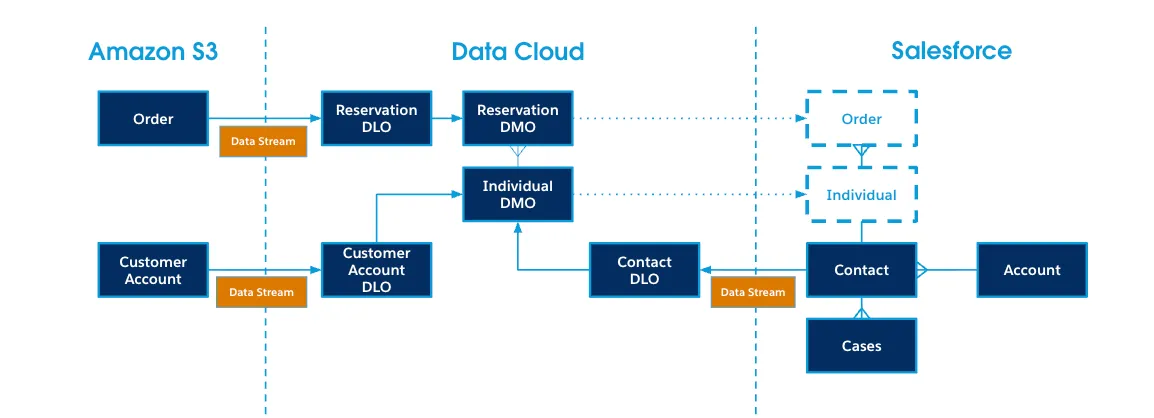
Along the way, you’ll also activate unified data back into Salesforce—so support teams can see customer and order context where they already work.
What you’ll do
Ingest and model data
- Ingest CRM data using the Salesforce CRM connector (Sales bundle)
- Connect to Amazon S3 and ingest Customer Accounts and Orders
- Map data lake objects (DLOs) to data model objects (DMOs), and extend the model with a custom Orders object
Unify profiles with identity resolution
- Identify duplicates (CRM + S3) and run an identity resolution ruleset to create a unified Individual
Activate data back into Salesforce
- Add an Orders related list to Contacts and configure a dynamic related list
- Create calculated insights (Lifetime Orders and Lifetime Value) and copy them to Contact fields
- Analyze Data 360 data with Reports, Flow, and SOQL (optional)
Continue with the exercises
- Exercise 1: Ingest Contacts using the CRM Connector
- Exercise 2: Create an Amazon S3 Connection
- Exercise 3: Ingest Customers from Amazon S3
- Exercise 4: Ingest Orders from Amazon S3
- Exercise 5: Create a Unified Profile
- Exercise 6: Access Unified Data from Salesforce
- Exercise 7 (Optional): Enhance Data with Calculated Insights
- Exercise 8 (Optional): Access Calculated Insight from Salesforce
- Exercise 9 (Optional): Analyze Data 360 Data in Salesforce Reports
- Exercise 10 (Optional): Query Data 360 Data in a Flow
- Exercise 11 (Optional): Access Data 360 with SOQL