


Health Cloud Administration
 j
jSupporting Medication Review
Patient Medication Manager
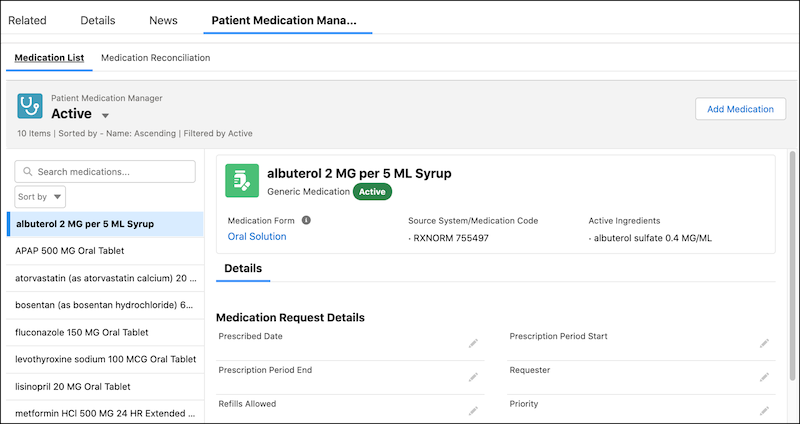
The Patient Medication Manager lightning component gives your clinicians a comprehensive list view of a patient's medications. This list view makes it easier for a trained eye to spot conflicting medications, which helps to reduce medication-related errors. Your clinicians can select a medication from this list to view details. Viewing the data in a single list view enables your clinicians to quickly review and update medications without navigating multiple records and objects.
RxNorm Integration
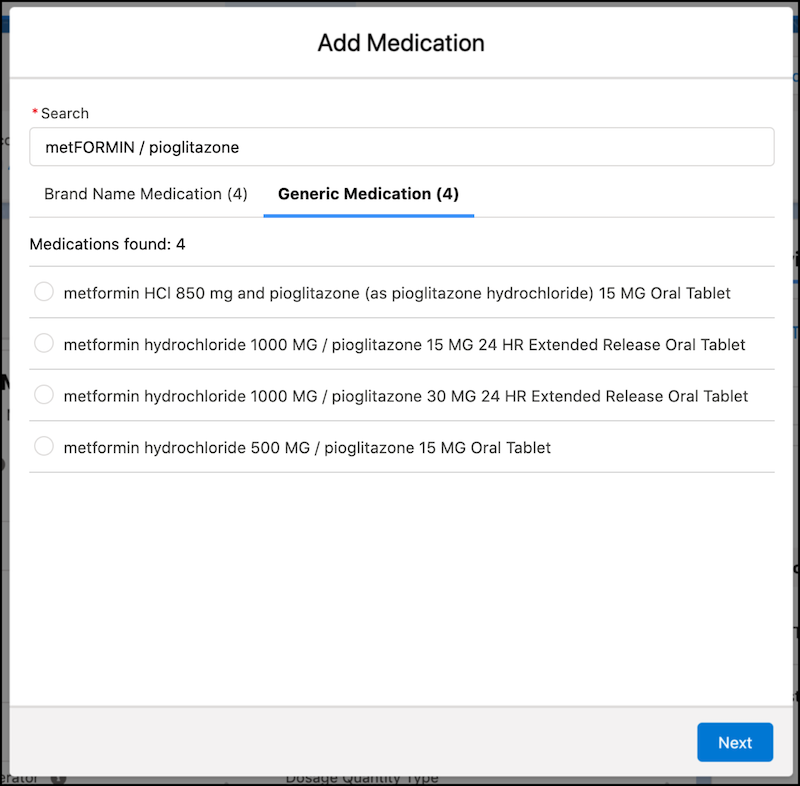
The Add Medication flow in the Patient Medication Manager lightning component is integrated with RxNorm to bring in standardized medication data from the U.S. National Library of Medicine. Your clinician just has to search for a medication based on its name or ingredients, select a medication from the results, and then enter the patient-specific prescription. Our flow takes care of everything else behind the scenes, like creating different types of records and saving medication-specific details from RxNorm. This flow reduces the amount of information a clinician has to manually enter, thus reducing medication issues caused by typing errors.
Your clinicians can also use the Add Basic Medication Details flow, a simplified version of the Add Patient Medication flow, to quickly add multiple medications to your patients. With this single-step flow, your users can simply select a branded or generic medication and add it to a patient. There's no urgency to update the medication details right away, as they can check back later to add the remaining information.