


Health Cloud Administration
 j
jAdd the Appointment Slots Lightning Component to a Record Page
Enable users to view and manage their scheduled and canceled appointments, and create
new ones, by adding the Appointment Slots Lightning component to a record page. You can configure
the Appointment Slots Lightning component on the record page of an Account, Case, Opportunity, or
Care Program Enrollee object.
|
Available in: Lightning Experience Available in: Enterprise and Unlimited Editions with Health Cloud or Health Cloud for Life Sciences |
| User Permissions Needed | |
|---|---|
| To access Multi-Step Scheduling features: | Multi-Step Scheduling permission set OR Manage Multi-Step Scheduling features |
- Go to the record page where you want to add the Lightning component.
-
Select
 and then select Edit Page.
-
In Lightning App Builder, drag the Appointment Slots component onto an editable part of the
page.
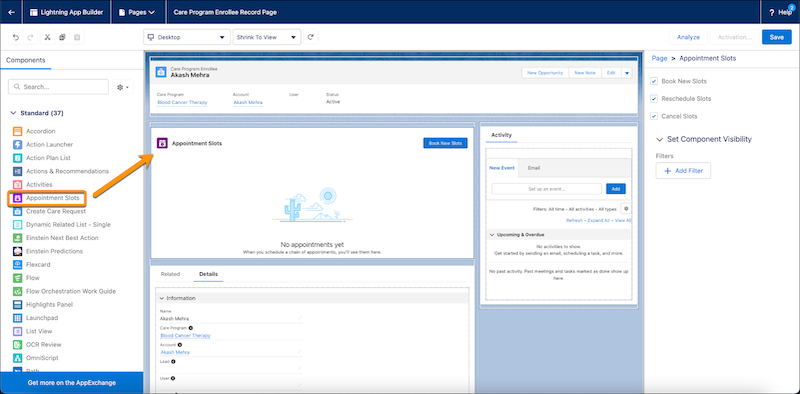
- In the Properties pane, select Book New Slots, Reschedule Slots, and Cancel Slots.
- Save and activate your changes.
- Assign as the org default.