


Health Cloud Administration
 j
jAssign Permission Sets and Permission Set Licenses To Your Advanced Therapy Management Users
Help users manage slots with Advanced Therapy Management by assigning them the required
permission sets and permission set licenses.
|
Available in: Lightning Experience Available in: Enterprise and Unlimited Editions with Health Cloud or Health Cloud for Life Sciences |
| User Permissions Needed | |
|---|---|
| To access Multi-Step Scheduling features: | Multi-Step Scheduling permission set OR Manage Multi-Step Scheduling features |
| To create, edit, and delete Health Cloud data: | Health Cloud Foundation perm set OR Manage Health Cloud |
- From Setup, in the Quick Find box, enter Users, and select Users
- Select the appropriate user.
- In the Permission Set License Assignment related list, and click Edit Assignment.
-
Select these permission set licenses:
- Health Cloud Platform
- Multi-Step Scheduling
- Salesforce Scheduler
- Click Save.
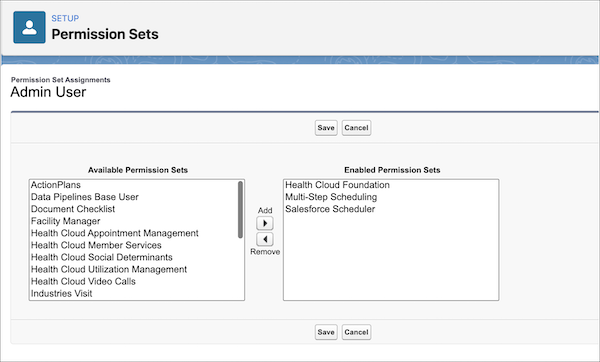
- In the Permission Set Assignments related list, click Edit Assignment.
-
Move the following permission sets to the Enabled Permission Sets list.
- Health Cloud Foundation
- Multi-Step Scheduling
- Salesforce Scheduler
- Save your work.