Health Cloud Administration
 j
jCare Plan Selector for Health Cloud Empower
The Care Plan Selector for Health Cloud Empower component is a picklist that helps an
Experience Cloud user select a specific person's care plan.
|
Available in: Lightning Experience Available in: Enterprise and Unlimited Editions with Health Cloud |
A user must be part of the care team to view its associated care plan in the picklist. If
the user doesn’t belong to any care teams, then the picklist doesn’t appear at all. If the
logged in user belongs to only one care team, the associated care plan is selected
automatically. When a user is a member of multiple care teams, every care plan they belong
to appears in the picklist.
- In your Experience Cloud site’s workspace, select Builder.
-
On the top-left corner of the page, click
 .
.
- Under Custom Components, select and drag the Care Plan Selector for Health Cloud Empower component onto an editable area of the page.
-
In the property editor, configure properties for the component:
- Placeholder Text for Picklist
- Enter the text that displays in the picklist before anything is selected. The default text is Select a name and care plan.... Placeholder text can’t be translated using the Translation Workbench.
- Show birthdate
- Select to add the person's birthdate to the picklist in addition to their name and their care plan name.
- Show all care plans
- Select to enable a person to see all the care plans they belong to. This option is only available if you’ve enabled multiple care plans in your org. If the person only has one care plan, this option doesn’t appear in the picklist.
- Include birth year
- Select to show the patient or member's year of birth in the picklist.
- Show birth month as text
- Select to display the person's birth month as Jan or Feb instead of 01 or 02.
Example
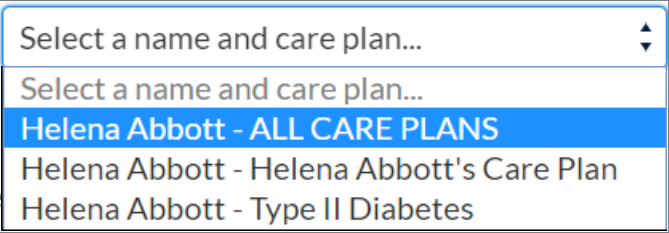
Sample Care Plan Selector for Health Cloud Empower component: