Health Cloud Administration
 j
jProvide User-Friendly Appointment Reasons
Give patients a set of easy-to-understand options to pick from when they’re asked the
reason for booking an appointment.
|
Available in: Lightning Experience Available in: Enterprise and Unlimited Editions with Health Cloud |
| User Permissions Needed | |
|---|---|
| To update picklists: | Customize Application |
| To create or update appointment reason records: | Health Cloud Appointment Management permission set AND Edit on Appointment Reason |
Appointment reasons are mapped to work types. When a patient selects a reason for their visit, the underlying work type is used to fetch available time slots.
For example, suppose a patient selects Annual Checkup as the reason for their visit. That reason maps to the work type called 30-minute office visit. That same 30-minute office visit work type can also map to additional reasons for the visit, such as follow-up appointment, diabetes checkup, or physical therapy.
Each reason for a visit maps to one work type. One work type can map to multiple reasons for a visit.
-
Create the appointment reason options.
- In Setup, go the Object Manager and click .
- In the Appointment Reason Picklist Values section, click New and enter your desired values in the text box, then save.
- To provide icons for appointment reasons, upload the icons to your Documents collection.
-
Map your appointment reasons to their corresponding work types.
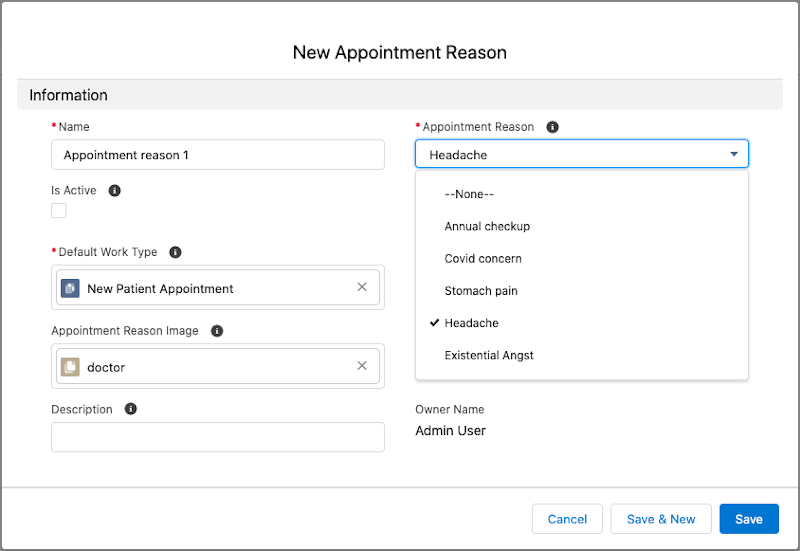
- In the App Launcher, find and select Appointment Reasons.
- Create an Appointment Reason record.
-
Specify the related work type for this appointment reason.
If you created different work types for new and established patients, specify the appropriate work type. If an established patient hasn't had a visit within the last three years, the patient is considered new. A new patient is offered a longer time slot.
- Save the record.