Health Cloud Administration
 j
jEnable Users to Apply Care Plan Templates Faster
Give your users the ability to apply care plan templates to existing care plans
faster. Place the custom Apply Care Plan Templates button on the
layout for the Care Plans page.
|
Available in: Lightning Experience Available in: Enterprise and Unlimited Editions with Health Cloud |
- From the object management settings for cases, go to Case Page Layouts and click CarePlan Layout.
-
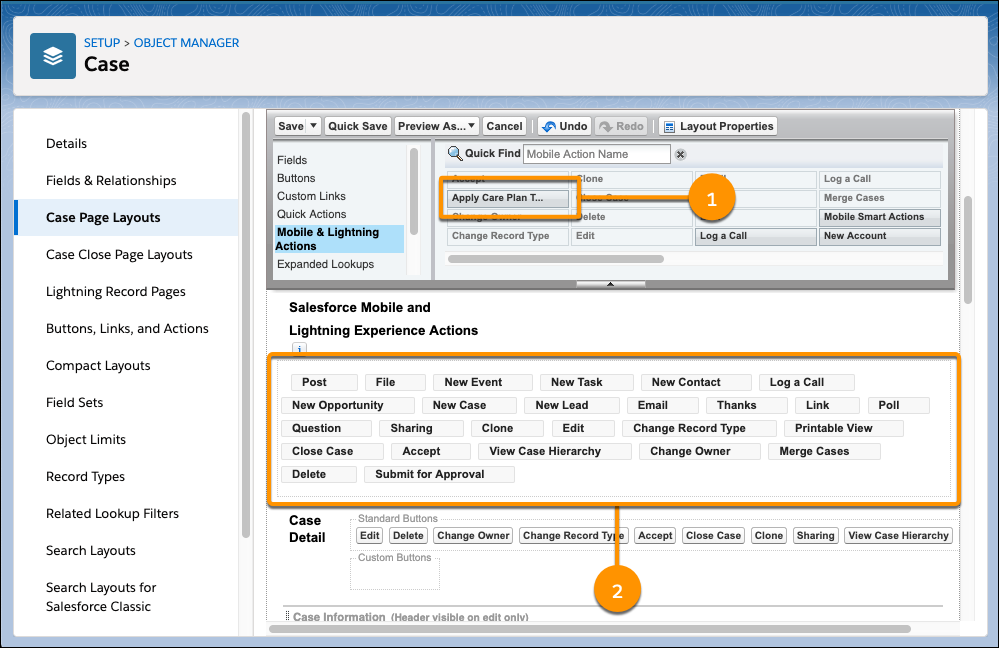
Click Mobile & Lightning Actions and drag the
Apply Care Plan Template button (1) into the
Salesforce Mobile and Lightning Experience Actions area (2).
To make Mobile & Lightning Actions writable, click override the predefined actions.
-
Click Save.