


Health Cloud Administration
 j
jMultiple Care Plans
A primary care plan is created for every new patient or member and added to their account. The Care Plan field on Account is automatically populated at the time of initial conversion, but you can add a different care plan in the future. You can set up a different process for updating that field, and create workflows for managing multiple open and closed care plans.
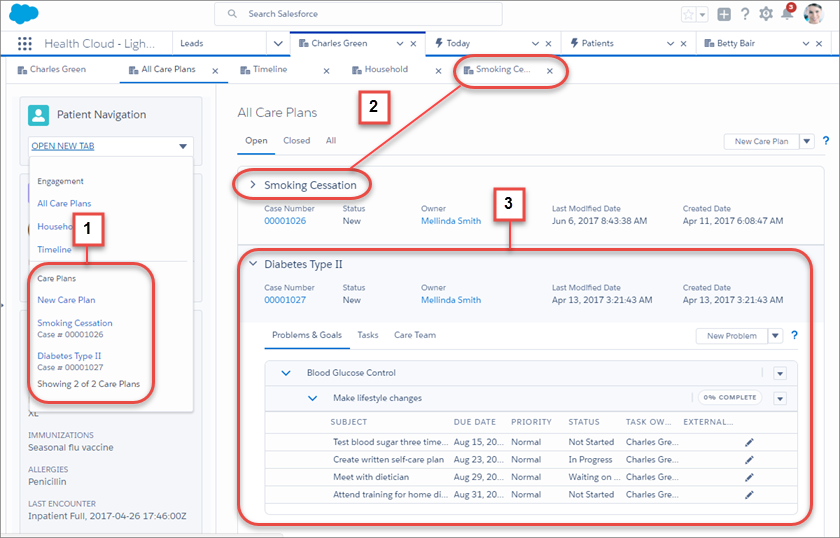
The patient card menu (1) provides easy access to manage any open care plan associated with the person. In the All Care Plans view, care coordinators can see and manage every detail of a care plan (2). It’s easy to expand a care plan and see its details or open a care plan and work on it in its own tab (3).
Initially, only the person's primary care plan appears in the All Care Plans view. (You can determine the primary care plan by viewing the value in the Care Plan field on their Account record.) As care plans are added for the person, they appear in the order in which they were created with the newest care plan appearing first. Create custom care plan record types to give care coordinators flexibility in tracking and managing their patients or members by using different types of care plans.