


Health Cloud Administration
 j
jUpdate Appointment Prediction Model Records
The CRM Analytics Prediction add-on uses Health Cloud records to create an appointment
prediction model. The data model can use records up to 730 days old. To keep the model up to date,
run a dataflow to refresh the model with new records.
|
Available in: Lightning Experience Available in: Enterprise and Unlimited Editions with Health Cloud |
| User Permissions Needed | |
|---|---|
| To use Einstein Discovery | CRM Analytics for Healthcare |
- From the App Launcher, find and select Analytics Studio.
- In the navigation tree, click Data Manager, then click Manage Dataflows.
- Click the DATAFLOWS tab.
-
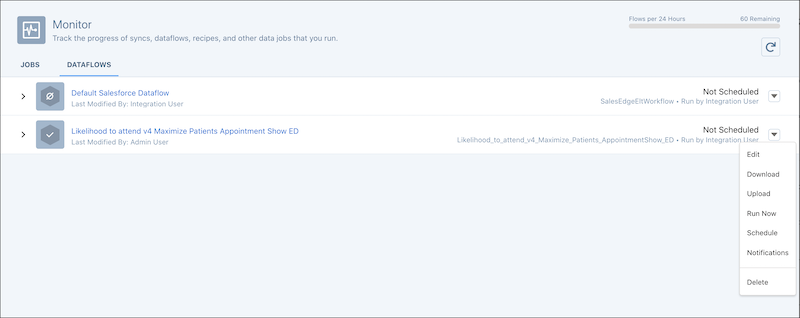
Identify the dataflow for your prediction model.
For example, Likelihood to Attend v4 Maximize Patients Appointment Show ED. Or something named more generic.
-
Click the dropdown menu for the dataflow and select one of these options.
- Run Now: To source new records from Health Cloud right away.
- Schedule: To run the dataflow later. To use time-based synchronization, specify your preferences using the Schedule by and Start at options. Otherwise, select Event-based and choose your event criteria, such as Salesforce local connection syncs.
- Save your changes.