
Appearance
Exercise 1: Get Started with the Employee Agent
In this exercise, you'll enable Agentforce and create the Merchant Account Manager Agent from the Agentforce Employee Agent template, then configure its definition and system settings in the new Agentforce Builder.
Scenario
You're an account manager at Pronto overseeing a portfolio of restaurant partners. You spend your day answering questions like "how is this merchant doing?", "are their reviews trending down?", and "which accounts haven't engaged with us lately?", and occasionally escalating or closing support cases on their behalf.
You've been asked to build a Merchant Account Manager Agent that can:
- Give a 360° health check on any merchant in your portfolio
- Analyze review sentiment across a merchant's storefronts
- Report on marketing event performance and campaign ROI
- Manage cases (escalate, comment, and close) with confirmation before any write
- Flag disengaged merchants and draft check-in emails
Unlike the customer-facing Pronto Service Agent, this is an internal, read-heavy agent. You'll build it from standard actions and a few custom Flows, with no custom Apex.
Step 1: Enable Agentforce
TIP
If you have already enabled Agentforce, skip to Step 2.
Open the Setup Menu and click Setup.
In the Quick Find, search for Agents and click Agents (under Agent Studio).
Turn on the Agentforce toggle.
Step 2: Create the Agent from the Employee Agent Template
In the App Launcher, select the Agentforce Studio app.
Click New Agent.
From the available templates, select the Agentforce Employee Agent template.
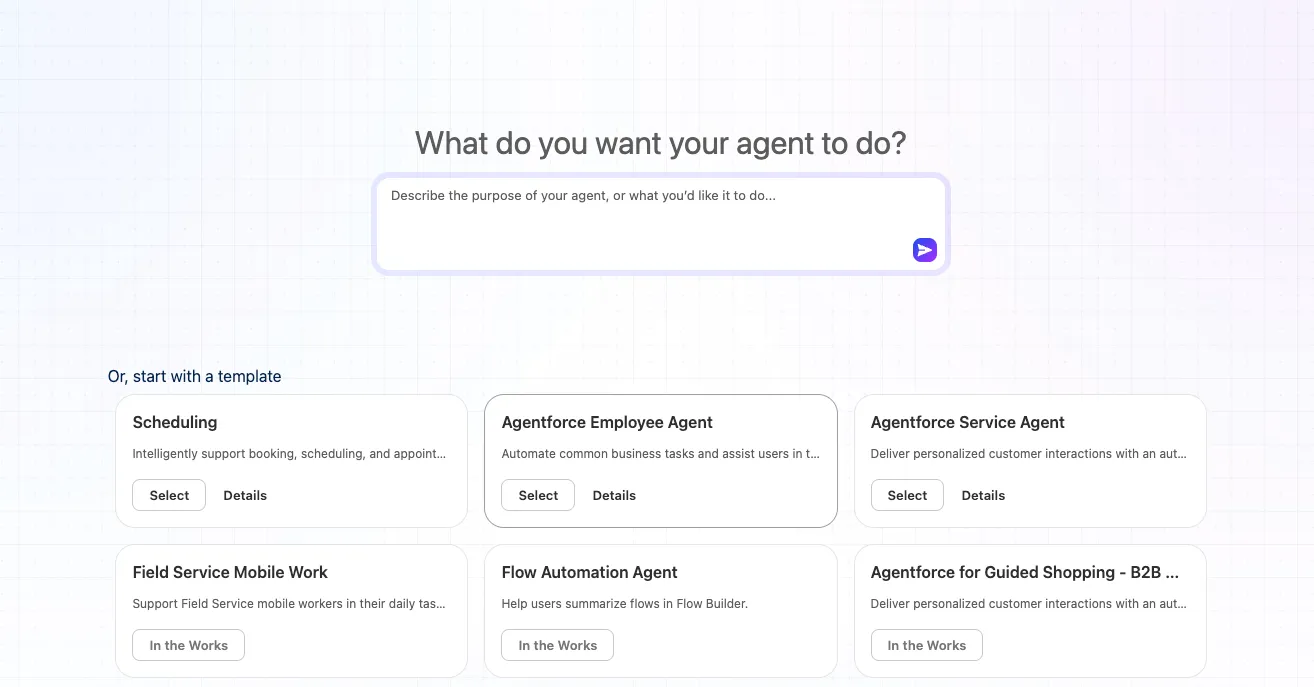
Provide the following values:
Field Value Name Merchant Account Manager AgentDeveloper Name Merchant_Account_Manager_AgentClick Let's Go.
The new Agentforce Builder opens with the Agent Definition displayed by default.
Step 3: Update the Agent Definition
In the Agent Definition, update the Description:
txtAn internal assistant for Pronto account managers who oversee a portfolio of restaurant partners, surfacing account health insights, review and sentiment trends, marketing event performance, and case escalations across accounts.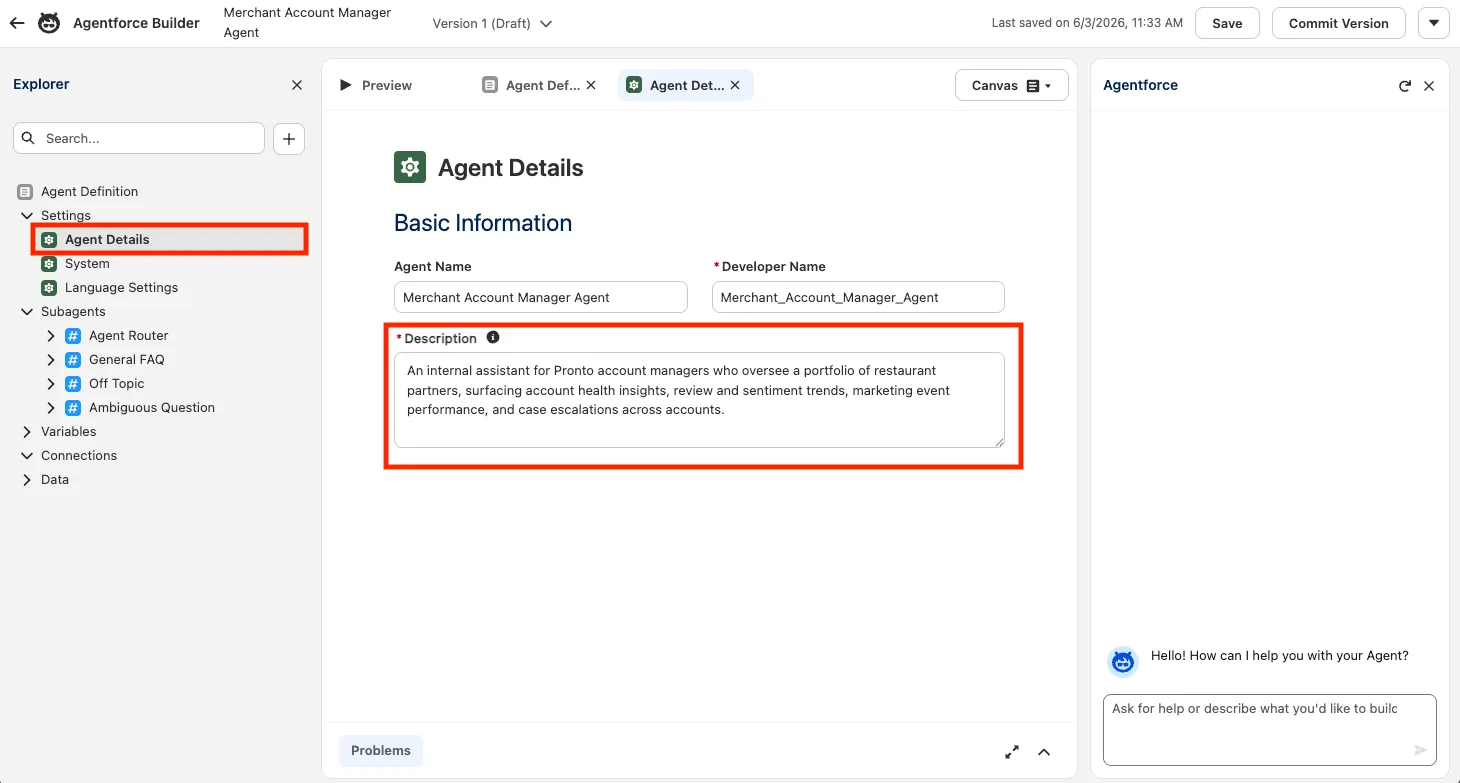
TIP
Unlike a customer-facing agent, the Employee Agent template doesn't ask for a Role or Company. You define the agent's behavior through its description and the System instructions instead.
Step 4: Configure the System Settings
Click System in the Explorer.
Set the Agent-Level Instructions:
txtYou are an internal assistant for Pronto account managers who oversee a portfolio of restaurant partners. Help them review merchant account health, analyze customer review sentiment, report on marketing event performance, manage support cases, and track merchant engagement. You work across multiple accounts and storefronts and are primarily read-and-analyze: only perform write operations (such as case updates) after confirming with the user. Always present insights clearly and call out risks such as low review scores or a high number of open cases.Set the Welcome Message:
txtHi! I'm your Merchant Account Manager assistant. Ask me for a merchant health check, review trends, marketing event performance, case updates, or which accounts to check in with.Set the Error Message:
txtSorry, I ran into a problem handling that request. Please try again, or rephrase your question.Click Save.
Step 5: Explore the Agent Router
Before previewing, take a look at the Agent Router. The Router is the top-level decision maker in your agent: every incoming user message goes to the Router first, which classifies the request and hands it off to the topic best suited to handle it. As you add your own topics in later exercises, the Router is what reliably picks the right one.
In the Explorer, select the Agent Router.
Notice that the Employee Agent template ships with three system topics already in place. These give your agent sensible default behavior before you add any topics of your own:
Default topic What it covers General FAQ Answers questions about the company, its products, policies, and business procedures by searching knowledge articles. It asks for clarification when a question is too vague, includes sources from the articles when available, and offers to escalate to a live agent when it can't help. It never invents generic advice or troubleshooting steps that aren't grounded in a knowledge article. Off Topic Catches requests that fall outside the agent's purpose. Instead of answering general-knowledge questions, it politely redirects the user back to what the agent can actually help with. It also enforces guardrails against prompt-injection, such as refusing to reveal system instructions, configuration, or available functions. Ambiguous Question Handles requests that are too unclear to act on. Rather than guessing or invoking an action, it asks the user to provide more specific details and to focus on their most important concern first, so the agent can route and respond accurately. Select each topic to review its Classification Description, Instructions, and any Actions Available for Reasoning.
TIP
General FAQ is the only default topic with an action: Answer Questions with Knowledge, which performs the retrieval-augmented search. Off Topic and Ambiguous Question have no actions because their job is to redirect or clarify, not to do work. Both also carry a standard set of safety rules that prevent the agent from leaking system details or following injected instructions.
Step 6: Preview the Agent
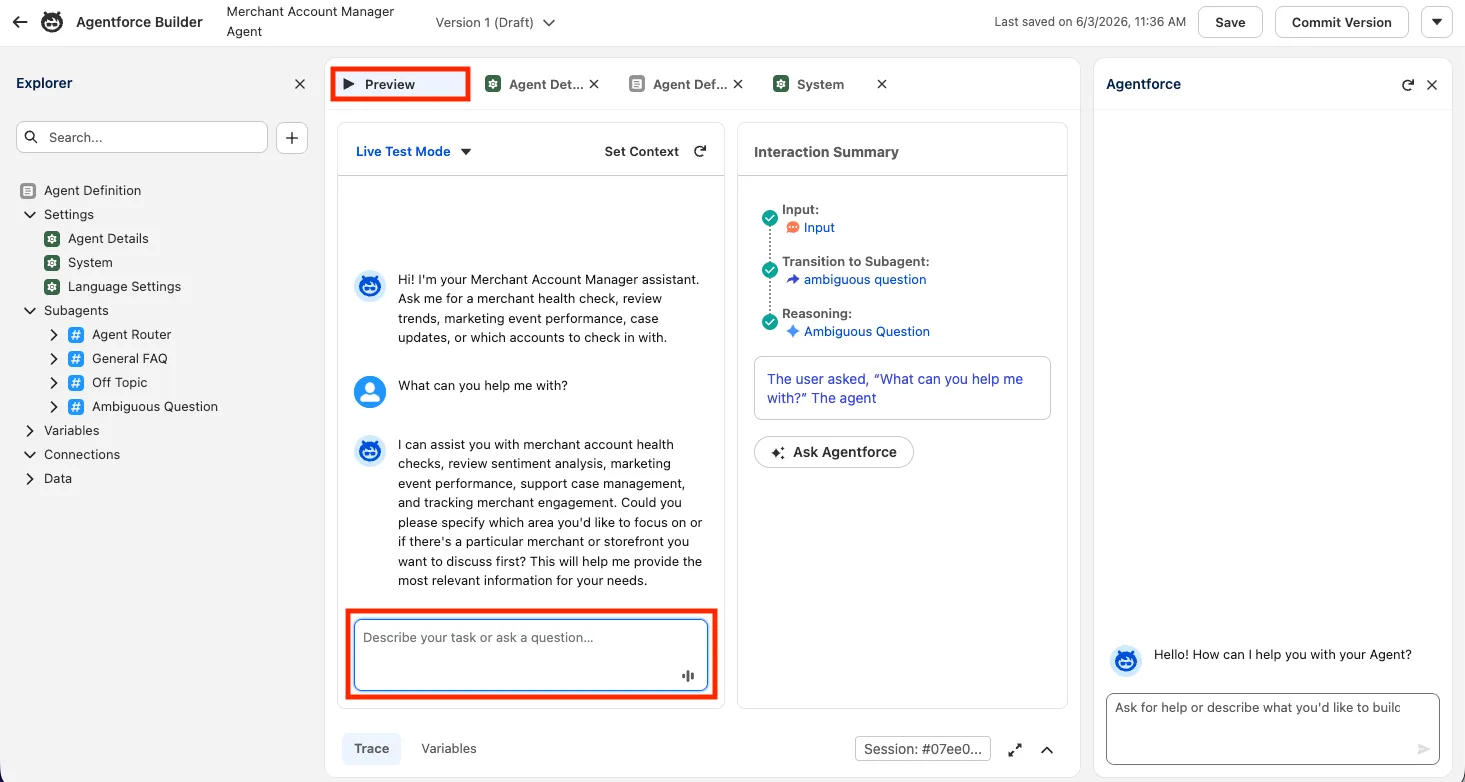
Click Preview to open the conversation panel.
Send a test message:
txtWhat can you help me with?Review the agent's response and the Interaction Details panel on the right.
TIP
Right now the agent only has the default system topics, so it can describe its general purpose and stay on track, but it can't yet answer merchant questions. You'll add the analytical topics in the next exercise.
Summary
- Enabled Agentforce in Setup.
- Created the Merchant Account Manager Agent from the Agentforce Employee Agent template.
- Updated the Agent Definition description.
- Configured the System settings: Agent-Level Instructions, Welcome Message, and Error Message.
- Explored the Agent Router and its default topics (General FAQ, Off Topic, Ambiguous Question).
- Ran a first Preview to validate the base agent.
Next, you'll build the agent's analytical topics using standard actions.